From live session to shipped order
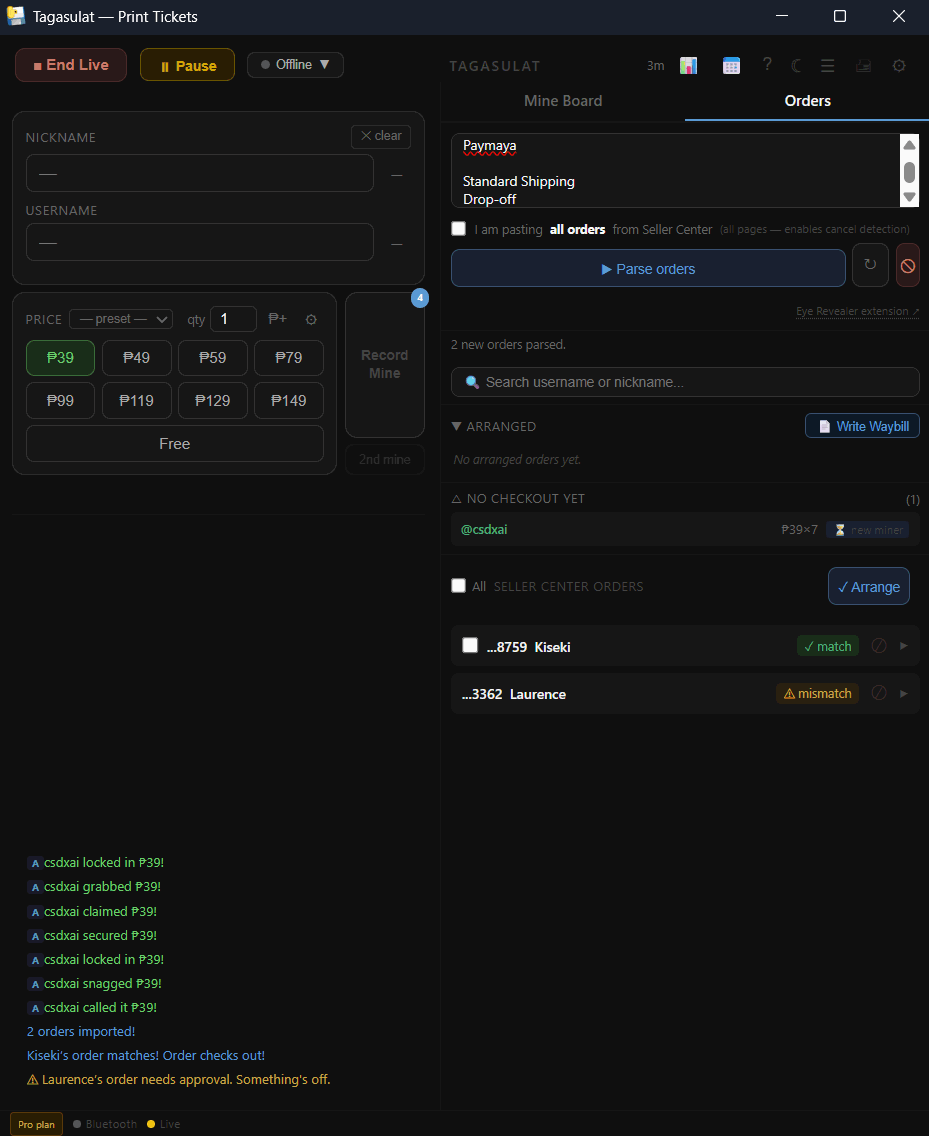
The Orders tab is where your printed labels meet your actual Seller Center orders. After your live, you paste your orders here, Tagasulat matches them to your mine board, and you arrange and ship.
Copy from Seller Center → — Get all pages of your orders. Use the Eye Revealer Chrome extension to reveal hidden buyer usernames before copying.
Paste and Parse — Paste your copied orders into the Orders tab and click Parse. Tagasulat reads every row and matches each order to a buyer on your mine board.
Review status pills → — Each order row shows a colored pill: Exact Match, Mismatch, Not in Session, and others. Learn what each one means and what action it needs.
Approve mismatches → — Orders that don't auto-match need manual review. Check the buyer name, confirm the order is correct, and approve it before it can be arranged.
Arrange orders → — Once orders are approved (or exact-matched), select them and mark them as arranged. This means the items are packed and ready for pickup.
Write names on the waybills → — Give the app the courier's waybill PDF and it writes each buyer's nickname and order number on the right page, plus summary pages at the end.
If you paste fewer orders than buyers in your session record, Tagasulat will block the Parse operation and show a warning. This is a safety check — it means you probably only copied one page from Seller Center instead of all of them.
If you see this warning, go back to Seller Center, scroll through all pages, copy again (with Eye Revealer active), and re-paste.