Approving Orders Basic+
Orders that didn't auto-match — Mismatches and Not-in-Session orders — need manual review before they can be arranged. Approval is your confirmation that you've checked the order and it's safe to proceed.
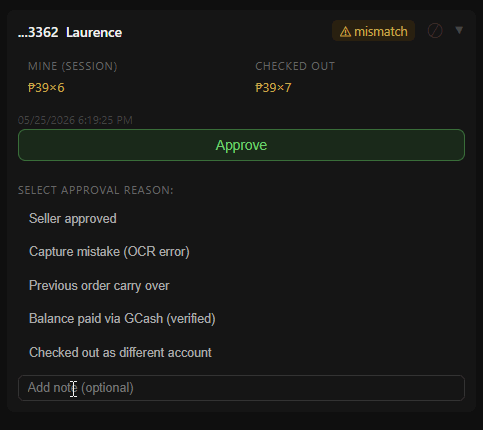
In the Orders tab, find rows showing a Mismatch or Not in Session status pill. These need your attention before they can be arranged.
Click the row to expand it. The card shows Mine (session) — what she mined on your board — next to Checked out — what her Seller Center order actually contains. A mismatch is usually a quantity or price that differs (₱39×6 mined, ₱39×7 ordered), or an order from someone who isn't on the board at all.
If they match — click Approve. A reason dropdown appears before confirming. Choose the reason that best describes why the order didn't auto-match:
- Seller approved — you checked it and it's fine as ordered.
- Capture mistake (OCR error) — the board has the wrong quantity or price because the pin was read wrongly; the order is right.
- Previous order carry over — the extra pieces are from a mine in an earlier live.
- GCash payment — she paid the difference directly; you'll be asked for the amount and reference so it's recorded.
- Checked out as different account — same person, different TikTok account at checkout. You'll be asked which buyer on the board she is; from then on the waybill prints her name, not the account that paid.
- Split checkout — she placed her order as two separate checkouts. Use this when you see two orders for one buyer.
On the PC you can add a short note. The reason is kept with the order and shows on the after-live and summary pages.
On the phone the same reasons are there (except Capture mistake — pasted orders can't be misread), plus two more: Seller added items and Payment for other items. GCash payment and Checked out as different account ask their one question the same way.
If they don't match — do not approve. Investigate manually. The buyer may have ordered without mining, or the order may belong to a different live.