How to Copy from Seller Center Basic+
Before you can match orders in Tagasulat, you need to copy your orders from TikTok Seller Center. This involves a Chrome extension called Eye Revealer that reveals hidden buyer usernames — without it, Tagasulat can't match orders to the names on your mine board.
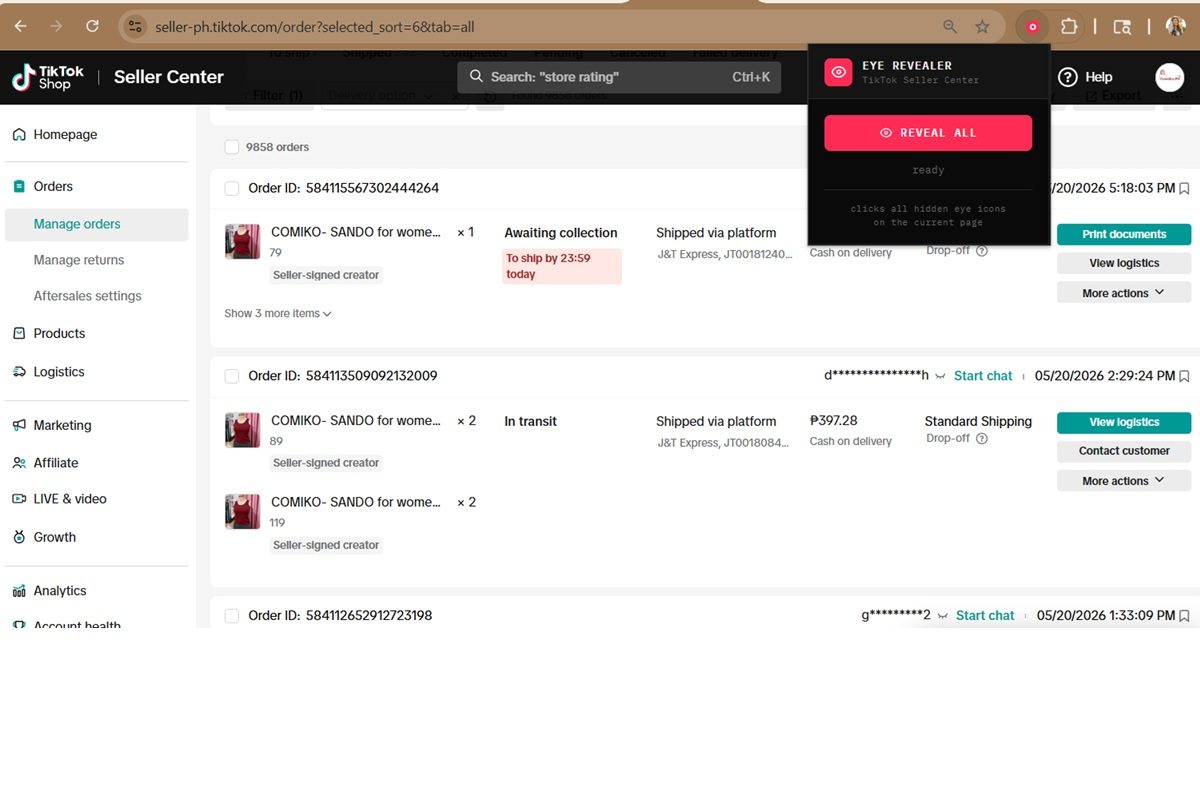
Install the Eye Revealer Chrome extension. It reveals hidden buyer usernames in TikTok Seller Center so Tagasulat can match orders correctly.
👁️ Install Eye Revealer on Chrome ↗
Install it on the same Chrome browser you use for Seller Center. The link is also available in the Tagasulat PC app (Orders tab) and on your Mimasaur dashboard.
Open Seller Center in Chrome and go to your orders for the live that just ended. Make sure you're viewing To Ship orders.
Activate Eye Revealer. Click the extension icon or its button on the page. Buyer usernames that were previously hidden or masked will now become visible.
Select all and copy — Use Ctrl+A to select everything on the page, then Ctrl+C to copy. Do this for every page of orders. If your live had 50 orders across 3 pages, copy all 3 pages.
Paste into Tagasulat's Orders tab and click Parse. Tagasulat reads the copied data and matches each order to your mine board.