After-Live Follow-Up Basic+
After-Live is a web page you open on your phone once a live ends. It collects everything that didn't sort itself out — mismatched orders, buyers who ordered without mining, and buyers who mined but never checked out — so you can clean them up from anywhere. What you do here decides what carries over into your next session, so it's worth understanding.
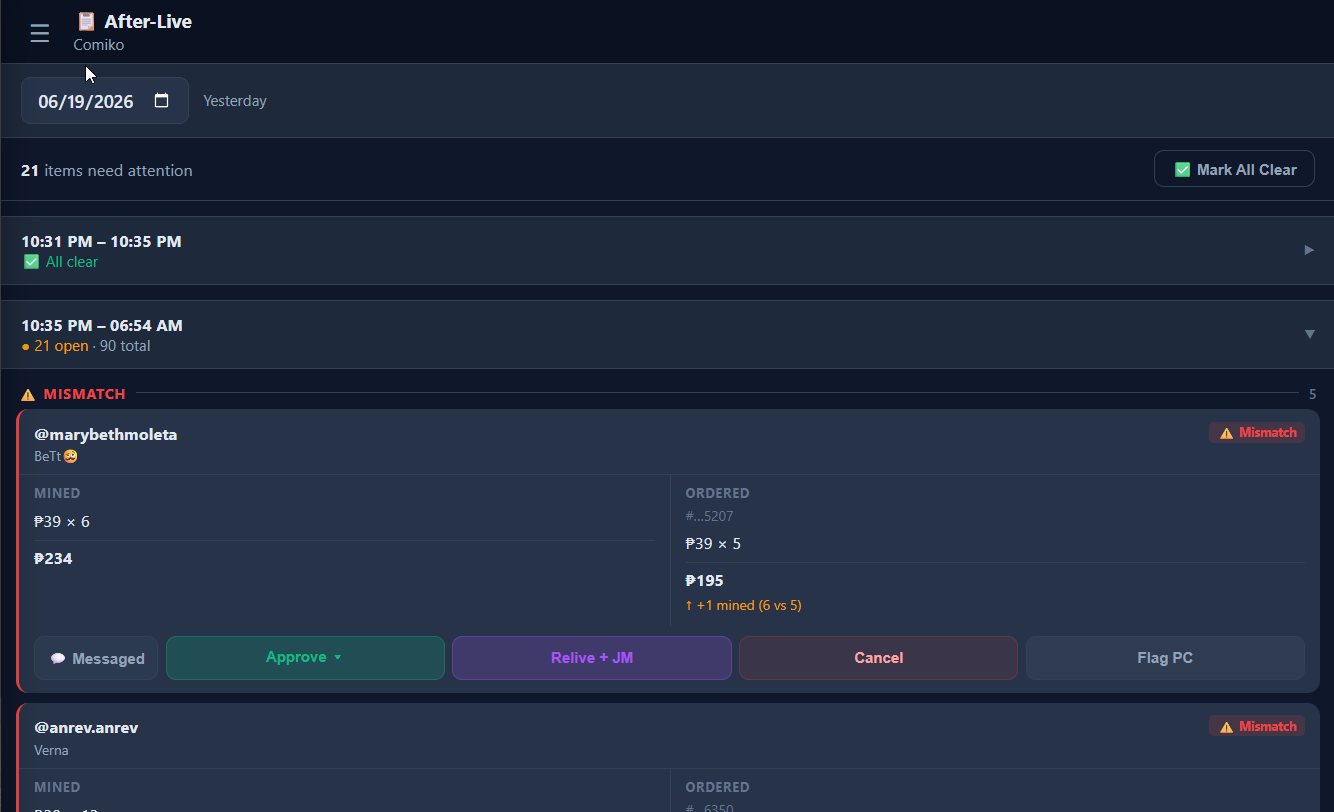
Opening it
Sign in to the Mimasaur dashboard on your phone and open After-Live. It shows one day at a time, grouped by session. A session that's fully handled collapses to ✅ All clear; anything still open shows a count of items needing attention.
The four kinds of rows
Mismatch — the buyer's order was found, but the details don't match what they mined (different quantity or price). Decide whether to accept it, resell, or drop it.
Unmatched — an order from a buyer who doesn't appear on your mine board at all (ordered without mining, or from a different live). Acknowledge it or cancel it.
No Checkout — the buyer mined items this live but never completed a Seller Center order. The classic "claimed it but didn't pay."
Carry-over — a No-Checkout buyer from a previous session who still hasn't resolved. They've been rolling forward, waiting for you to act.
What each action does
Every action is really you telling the app "I've handled this." The important part is whether it stops the buyer from carrying over to your next session:
| Action | What it does | Carries over next session? |
|---|---|---|
| Approve ▾ | Marks the buyer resolved — e.g. they paid late or via GCash/Maya (there's a built-in Direct Payment form to log the amount & reference). | 🛑 No — stops |
| Resell + JM | You resold the item to someone else. Drops the mine and tags the buyer a Joy Miner. | 🛑 No — stops |
| Cancel | Drops the buyer's unpaid mine. Asks if you also want to tag them a Joy Miner (Cancel + Joy Miner) or just drop it (Cancel only). | 🛑 No — stops |
| Acknowledge (unmatched) | Marks an unmatched order as reviewed. | 🛑 No — stops |
| 💬 Messaged | A note that you've contacted the buyer. Informational only. | ↩️ Yes — still carries |
| Flag PC (mismatch) | A note to fix this one on the PC later. Informational only. | ↩️ Yes — still carries |
| (do nothing) | Leave the row untouched. | ↩️ Yes — carries over |
If you don't touch the No-Checkouts
Nothing is lost. Every No-Checkout buyer automatically carries over into your next session as a Carry-over (🔄) — their mined items reload onto the board so they can check out next time, or you can follow up. They'll keep reappearing every session until they either check out, get resold, or you Cancel them. The trade-off: a buyer who never resolves slowly builds a missed-checkout streak and eventually gets auto-flagged as a Joy Miner →.