After You End a Live Pocket+
Ending the live closes the books on that stream: what was mined, what it added up to, who is arranged, who still hasn't checked out. Where you see that depends on the device.
Tap ■ End Live. The confirmation lists what's still open — orders not yet arranged, buyers with no checkout — so you can go back if you meant to finish them first.
A Session Ended card appears. 📋 View History opens 📦 Others → 📋 History, where every past live is listed with its buyers, totals and ended time.
Buyers who didn't check out are now waiting in After-Live on the dashboard. What you do there decides who carries over into your next live.
Ended a live too early, or does the after-live look incomplete? In History, tap 🧩 Rebuild after-live on that live — it recomputes the follow-up list from the mines and orders. Safe to press twice.
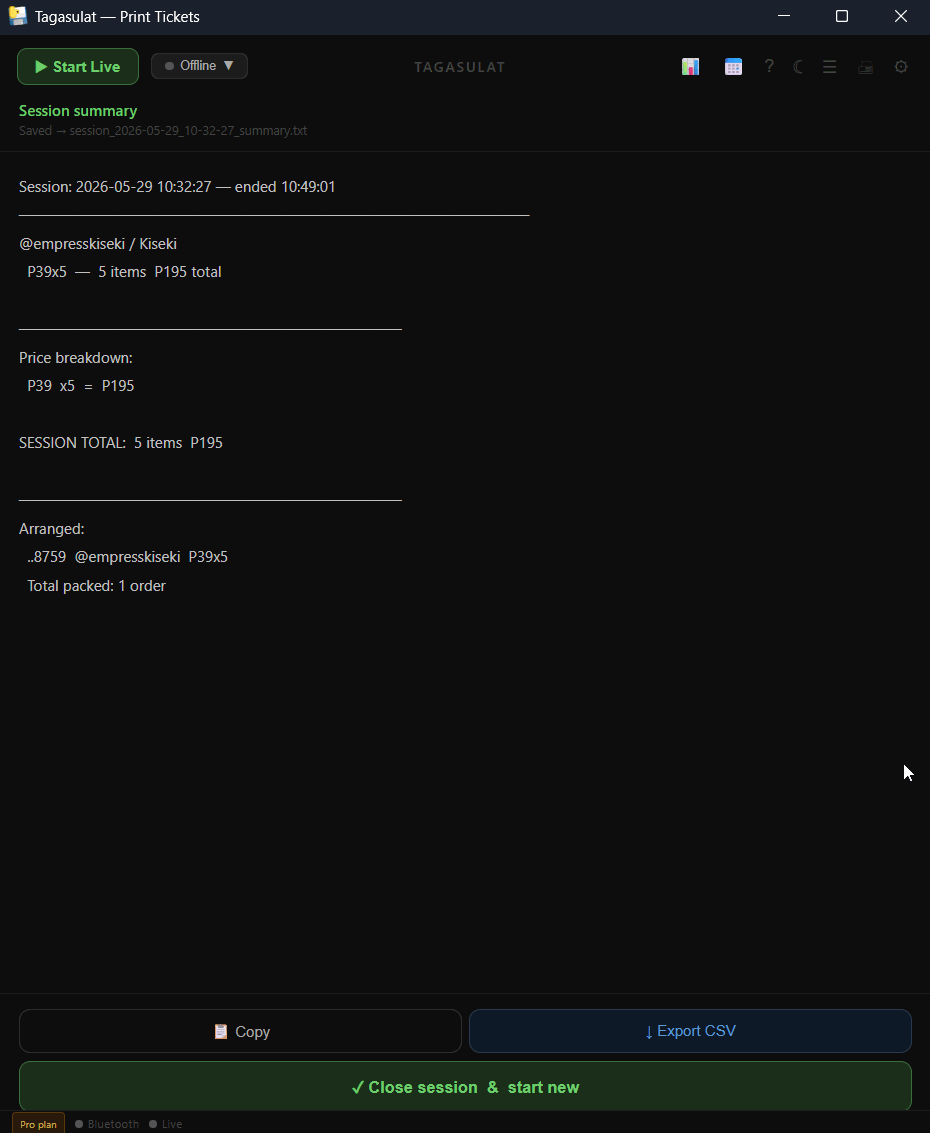
Click ■ End Live and confirm.
The Session summary appears: every buyer with her prices and total, a price breakdown, the session total, and the arranged orders. It's also saved as a text file next to the app.
📋 Copy puts the summary on the clipboard — paste it into Messenger or a note. ↓ Export CSV (Pro) saves a spreadsheet file for Excel or Google Sheets.
✓ Close session & start new clears the board. Carry-overs are set up automatically; they're on the board the next time you Start Live.