Lock Mine Pro
Some stores let a buyer "lock" an item — pay a little extra to have it reserved for her
instead of going to the next miner. She comments L or lock and gets pinned. Lock
Mine spots that comment and adds your lock fee on top of the price automatically, so the
label prints at the right total without you doing the sum mid-live.
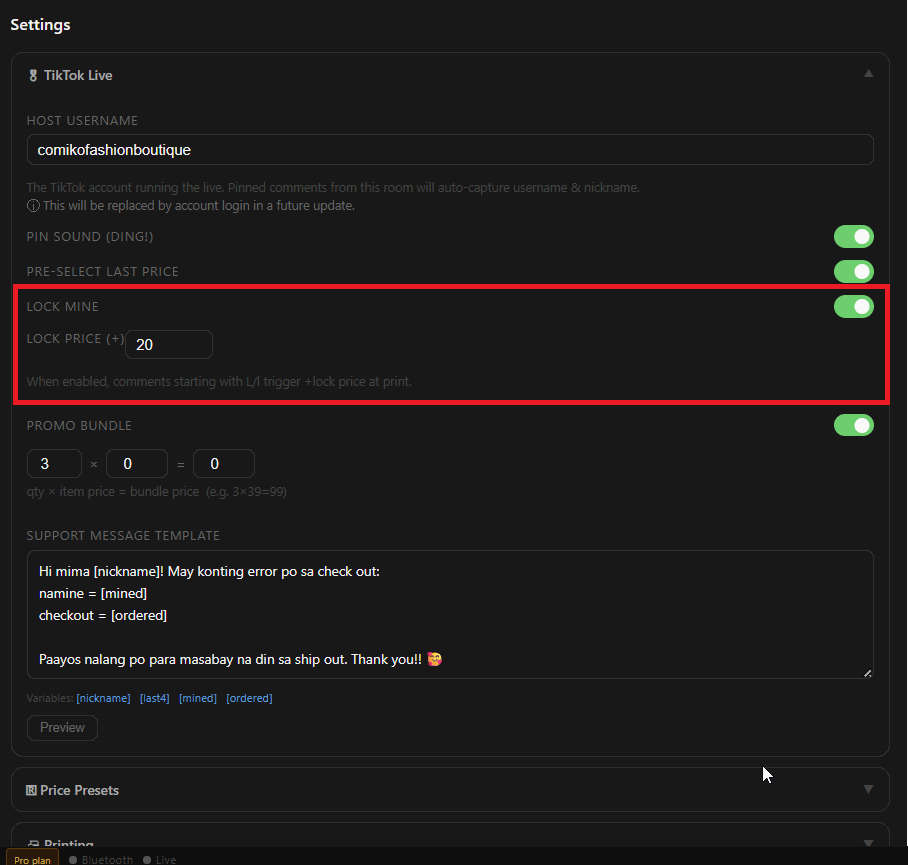
On the PC: Settings → 🎬 TikTok Live → Lock Mine. Switch it on and set the Lock Price — the fee added on top, for example ₱20. On the phone the same setting is under ⚙️ Settings → 🔒 Lock price.
During the live, a buyer whose pinned comment starts with the letter L ("L", "lock", "Lock 39") is treated as a lock. The pin banner shows the sum — 39 + 20 = 59 — and the price is pre-selected at the total.
Print as usual. The label carries the locked total (₱59), and the mine is recorded at that amount.
Wrong call? Tap a different price before printing — the lock is a suggestion, not a rule.