Quick Print Shortcuts Pocket+
During a busy live every tap counts. These are the gestures that skip the form — reuse a buyer who's already on the board, or reprint at the same price, without typing anything.
Double-tap a buyer's card — her nickname and username go back into the form. Pick a price and print. Handy when she mines again at a different price.
Double-tap a price pill on her card (say ₱39 ×2) — one more label at that price prints immediately, no form. That's the reprint / "one more" gesture.
⋯ on a card (or press and hold) opens the card menu: ✓ Checked out, 🕊 Forgive, ☠️ Re-Live, 🚫 Blacklist.
⌫ next to the name fields clears both at once, so a wrong name never gets printed.
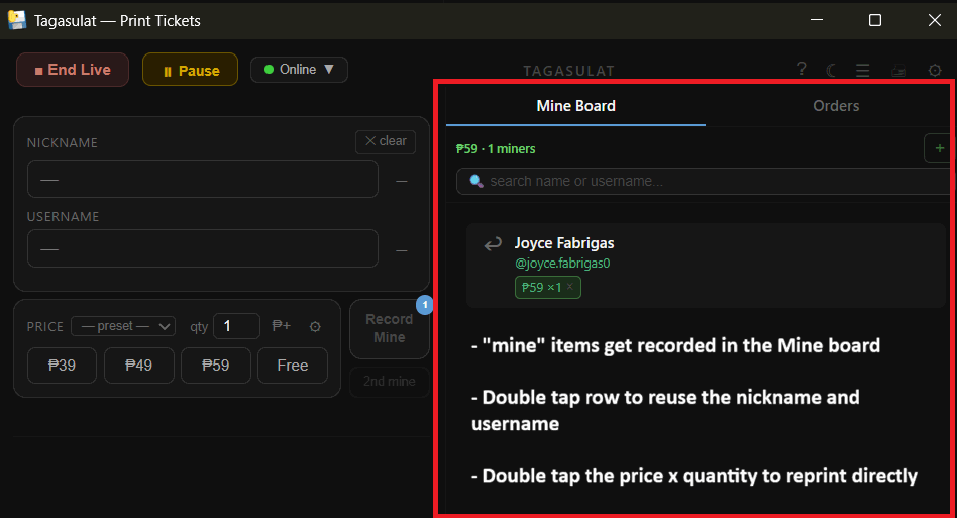
Double-click a buyer row — nickname and username fill the form. Pick a price, press Enter.
Double-click the price × quantity pill to reprint at that price — no refilling, the quantity goes up by one.
Enter prints the pin-captured buyer at the selected price. A price must be selected first.
Right-click a row for the menu: Copy, Buyer note, Edit username, Checked out, Blacklist, Delete, Re-Live.