Adding Prices Pocket+
Your price buttons are the amounts you tap during a live to stamp a price on a buyer's mine. Set them once — they're saved to your store, so the phone and the PC show the same buttons. Free is always there and doesn't count as one of yours. On the Pocket plan you can have up to 4 prices; Basic and Pro have no limit.
Open ⚙️ Settings → 💰 Price buttons. Your current prices are listed; tap ✕ to remove one.
Type an amount in Add a price — just the number, like 199 — and tap ➕ Add.
Tap 💾 Save settings. The buttons on the board update at once, and the PC picks them up too.
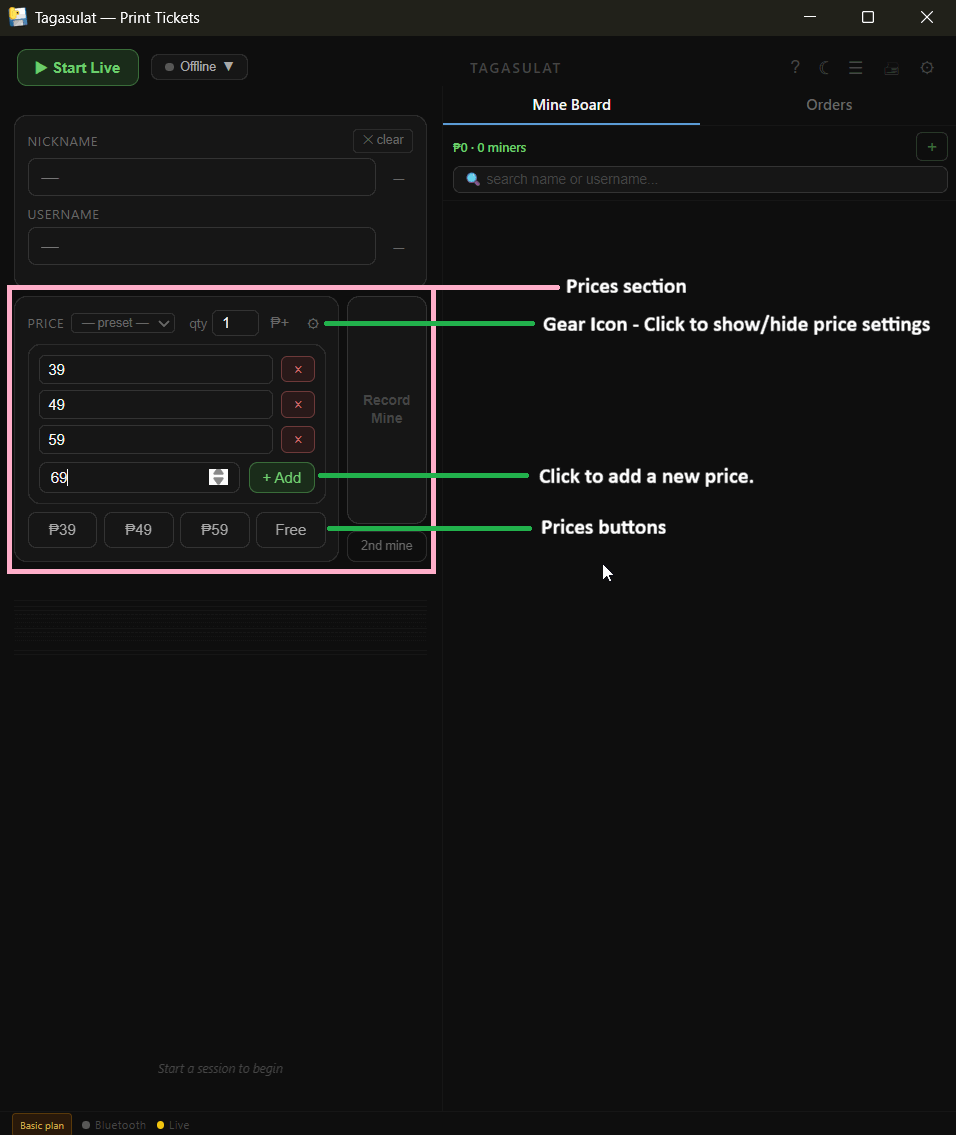
In the form, click the ⚙ next to the price row to open the price editor.
Change an amount in place, click ✕ to remove one, or type a new amount and click + Add. Changes save by themselves.
Need a one-off amount for a single buyer? Click ₱+, type it, print — it isn't added to your buttons.